
Add a Customer to Your Order
How Do Customers Work In DecoGro?
Section titled “How Do Customers Work In DecoGro?”In DecoGro, a customer is a contact at a company. A company can have multiple contacts, but a contact can only belong to one company.
How Do I Add a Customer to an Order?
Section titled “How Do I Add a Customer to an Order?”-
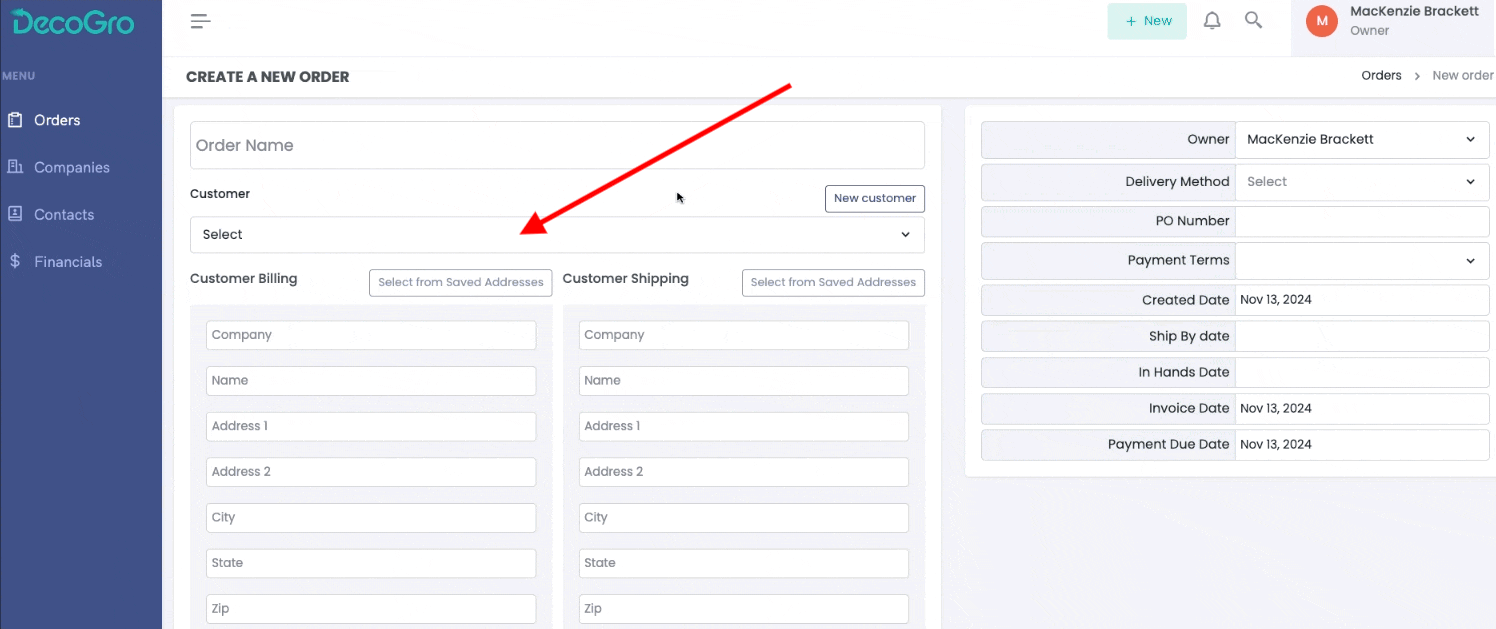
To add a new customer to an order, simply click the New Customer button on the edit invoice page. Then, fill out all applicable fields.

-
To add an existing customer to an order, click on the Select Dropdown under Customer. Search for a customer by typing in the contact or company name, then click on the customer you want. When you select an existing customer, all of their default information will autofill. This can include billing addresses, shipping addresses, payment terms, and more.
How Do I Add a Customer Without Creating an Order?
Section titled “How Do I Add a Customer Without Creating an Order?”You can add a new customer at any time inside of DecoGro by clicking the green + New button in the top right of the screen, and then selecting + New Customer.
